Pricing 2026: Instant discount pricing page (monthly + annual)
Developer handoff · 2 Nov 2026 · separate from the Question discount handoff (open it) · PDF
Flow (the current live flow, now with monthly)
- Plans with a Yearly / Monthly switch at the top.
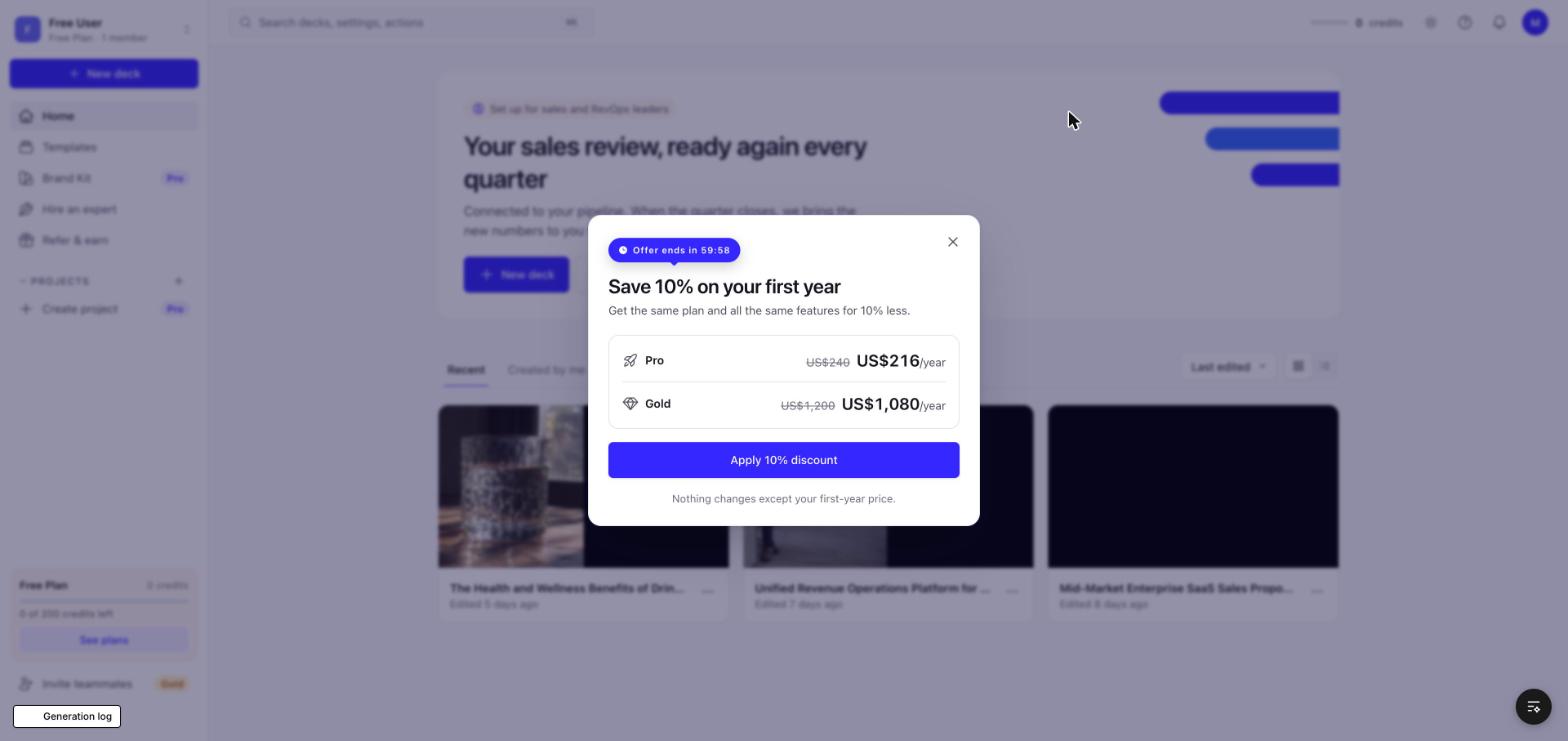
- Close the plans: the instant offer pops up straight away (10% off the first year, one-hour timer).
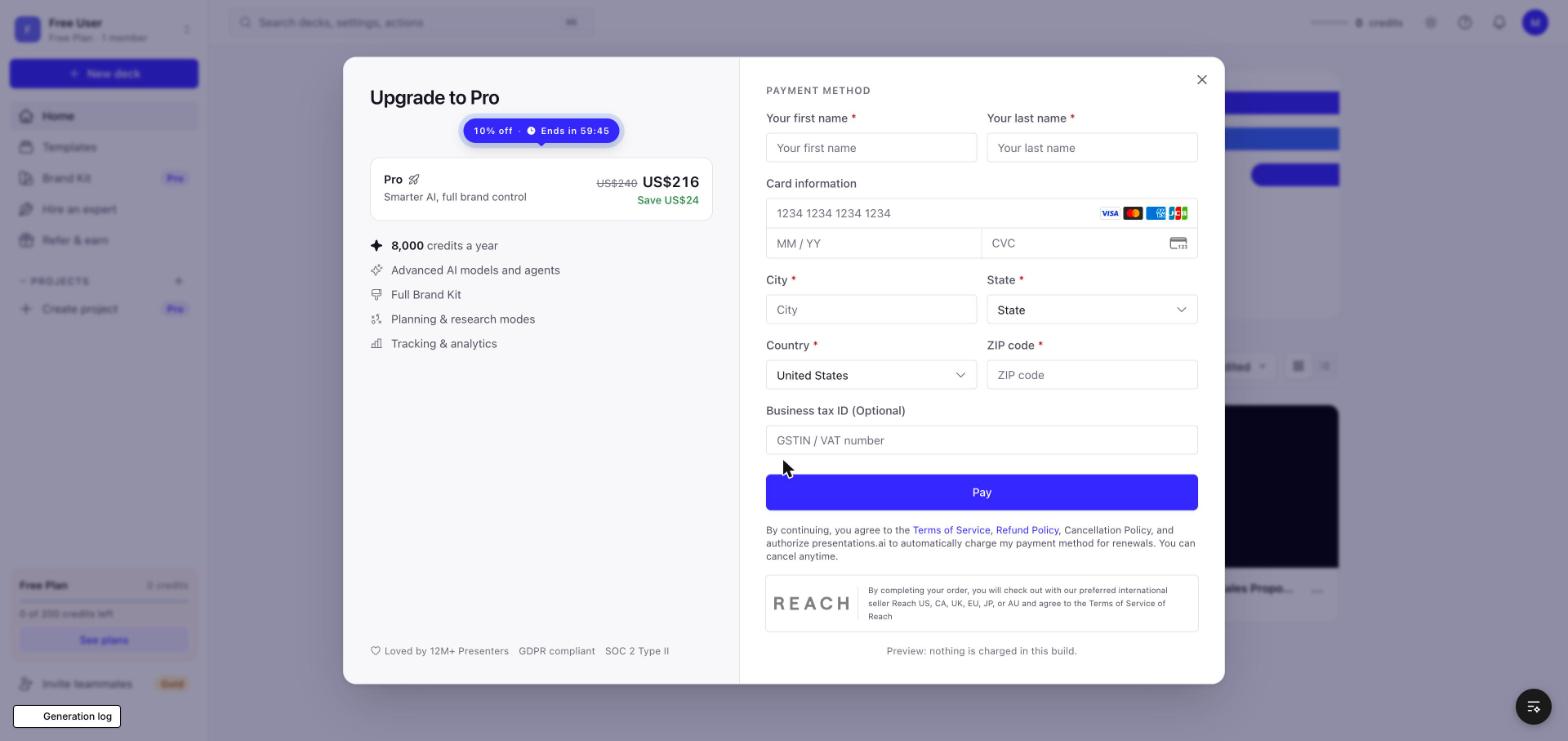
- Apply it: the yearly checkout with the offer pill, struck price and Save line.
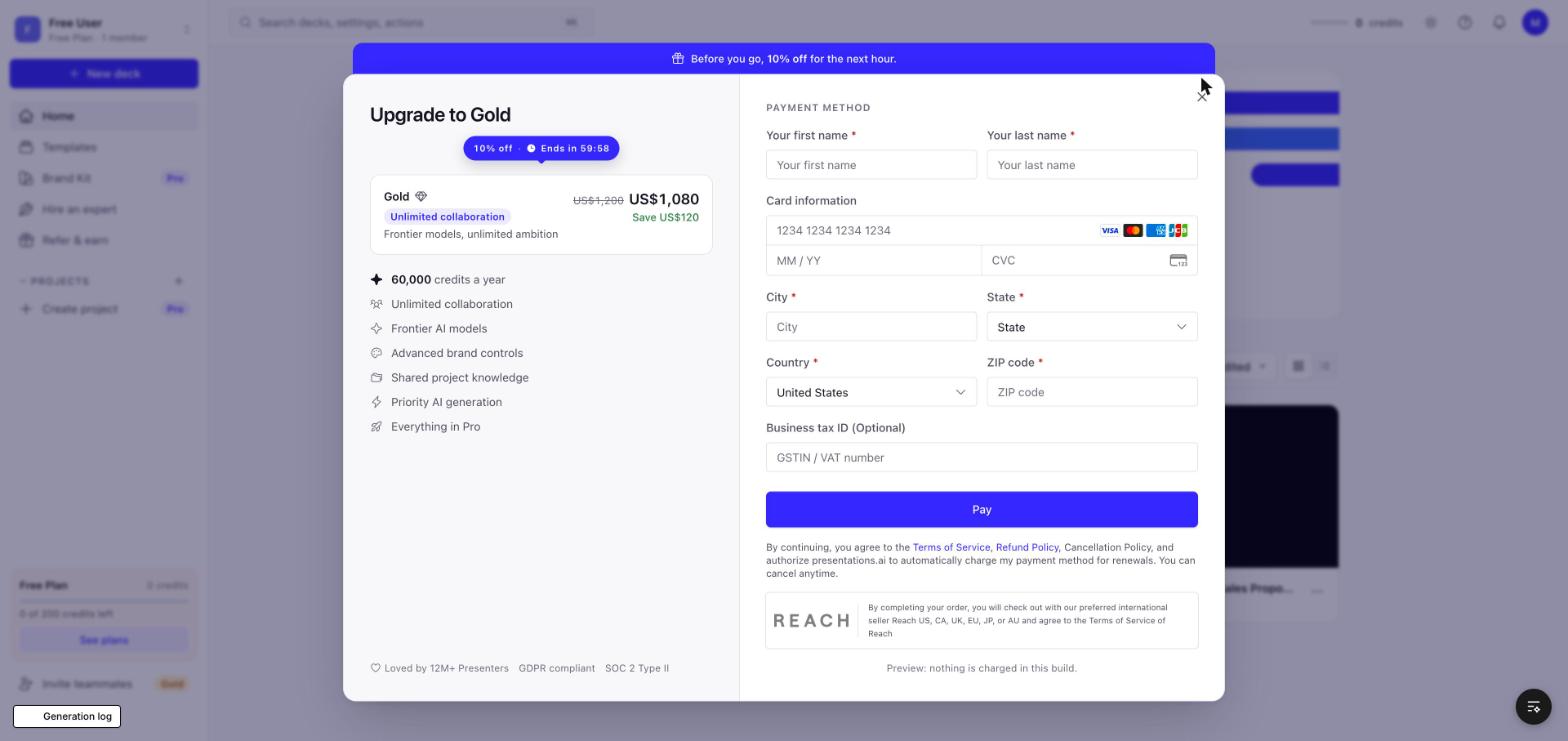
- Buy a yearly plan without an offer and close the checkout: "Before you go, 10% off for the next hour." applies in place.
- Monthly plans check out at full price; the instant offer is yearly only.
Checkout rules (same as the Question discount page)
- Only the plan being bought, in a plain white card: no radio, no selection styling, no other plans (plan changes live in Manage your plan).
- No order summary. Right side is the live card form.
Numbers (US, price sheet of 2 Nov 2026)
| Plan | Price | With 10% offer | Credits |
|---|
| Pro yearly | US$240 | US$216 first year | 8,000 |
| Gold yearly | US$1,200 | US$1,080 first year | 60,000, Unlimited collaboration |
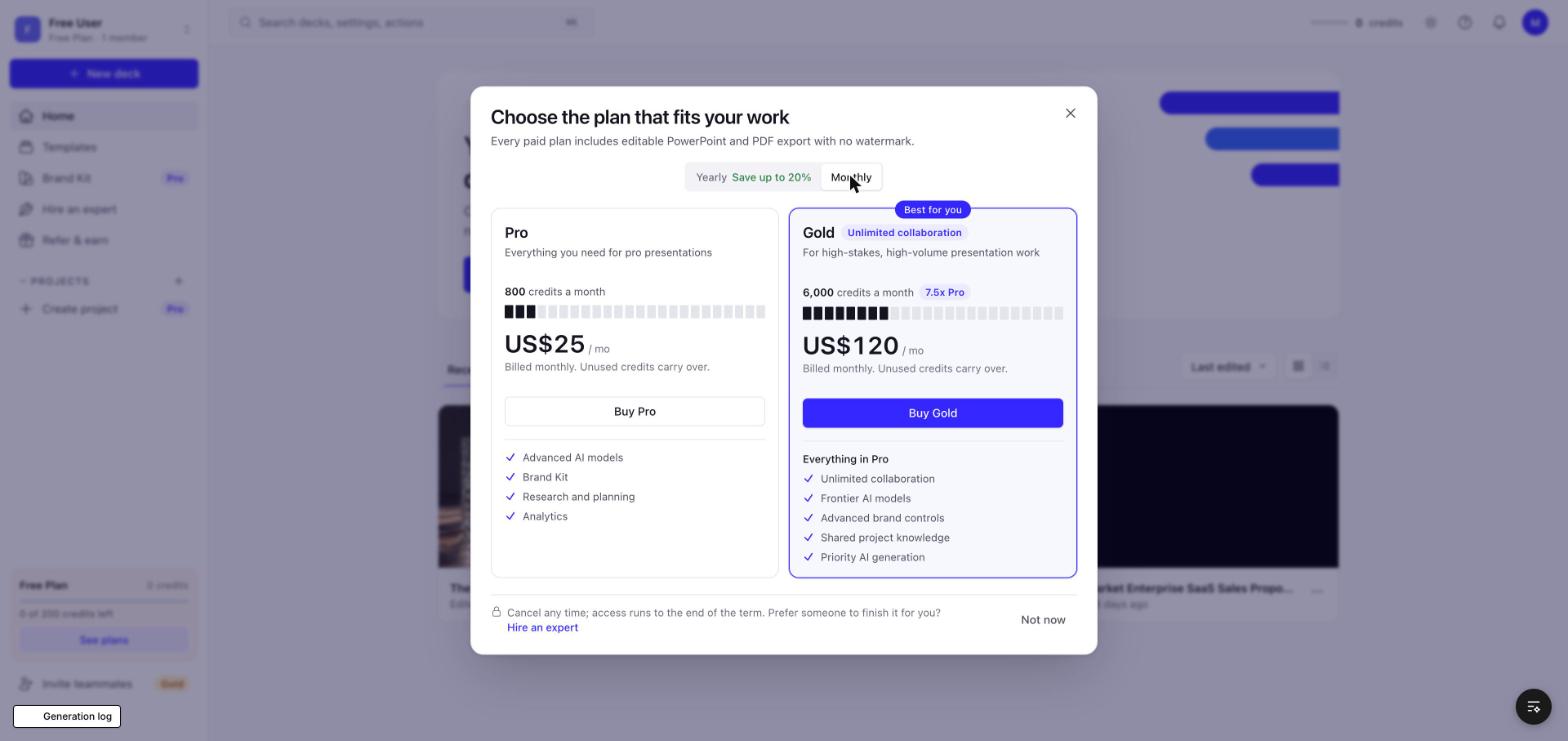
| Pro monthly | US$25 | no offer | 800 a month |
| Gold monthly | US$120 | no offer | 6,000 a month |
Code
- PricingScreenV2.jsx: Yearly / Monthly switch (instant page), instant offer on close, yearly / monthly checkout routing, no offer on monthly cards.
- PreviewCheckoutV2.jsx: kind "year" with the offer pill, struck prices and the in-place "Before you go" offer (inPlaceOffer), kind "month".
- Live equivalents: CloseNudgeV2 (instant offer), CheckoutScreenV2 handleClose (in-place offer), CheckoutSummaryV2 (pill, struck price). The local build runs the offer client-side on the US preview catalog; the live code resolves and claims it on the server (resolveCloseOffer / applyCloseBump).
- Not included: the bottom-right "last call" reminder (useOfferReminderV2) after the hour ends.
All scenarios
How it works · Public links: "Screen" opens that scenario in this handoff, "Image" the full screenshot, "Design proto" the matching interactive design.
How it works
1. Plans
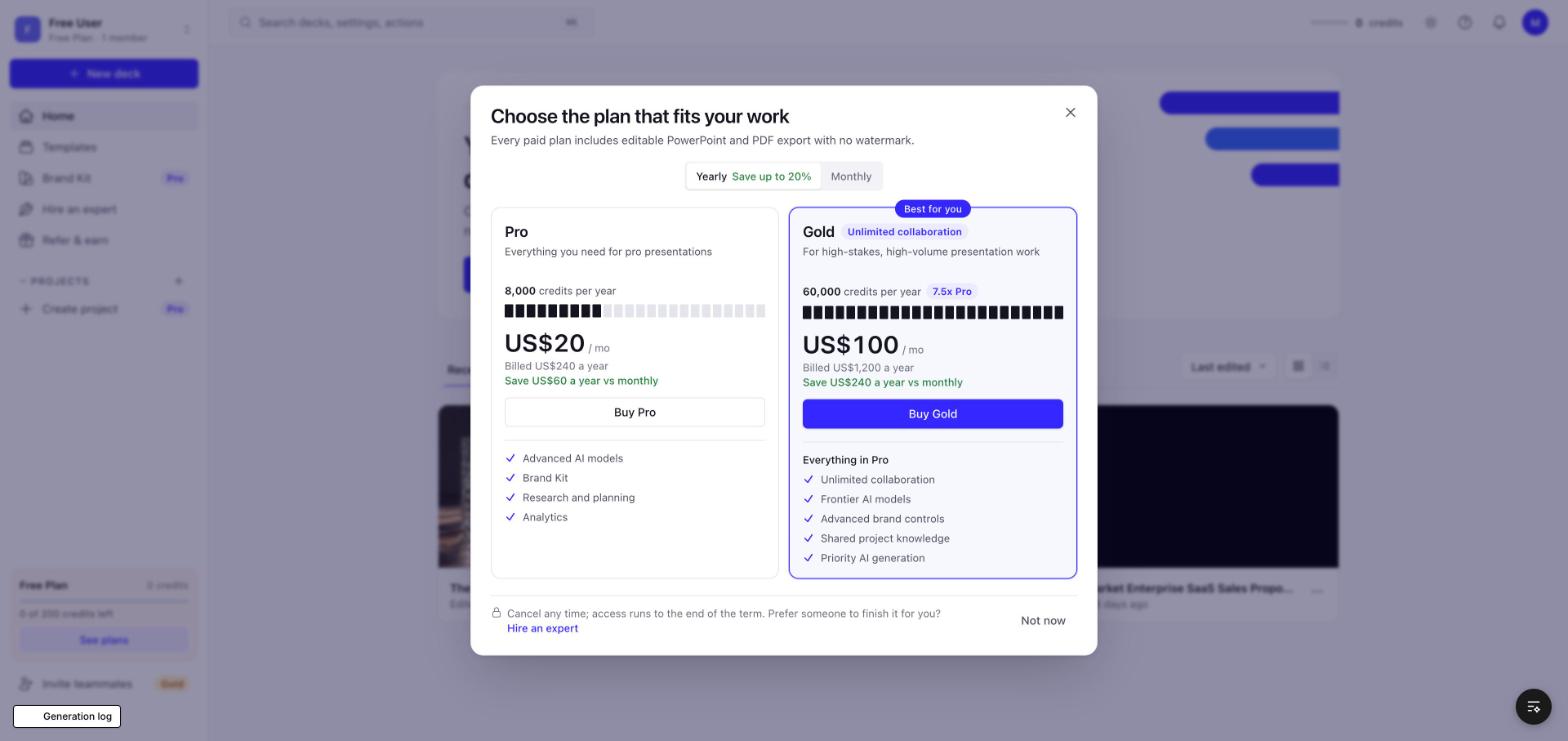
- Free account opening the plans: Yearly / Monthly switch at the top, Yearly selected ("Save up to 20%"). US: Pro and Gold; no Basic. No Team plan (3 Nov update): Gold is the team plan, same price and credits, plus Unlimited collaboration. Gold shows an "Unlimited collaboration" tag next to its title (pricing cards, Manage your plan, checkout) and lists it first under "Everything in Pro".
- Yearly cards show "Save US$X a year vs monthly". Monthly cards show "Billed monthly. Unused credits carry over."
2. Instant offer on close
- First close of the plans, free accounts only: the instant offer pops up straight away, "Save 10% on your first year" (PRESENT10, CLOSE_COUPONS.pricing) with a one-hour timer (CloseNudgeV2).
- Apply 10% discount opens the yearly checkout for Pro (or the chosen plan) with the offer pill, the struck price and "Save". Close on the offer closes the plans.
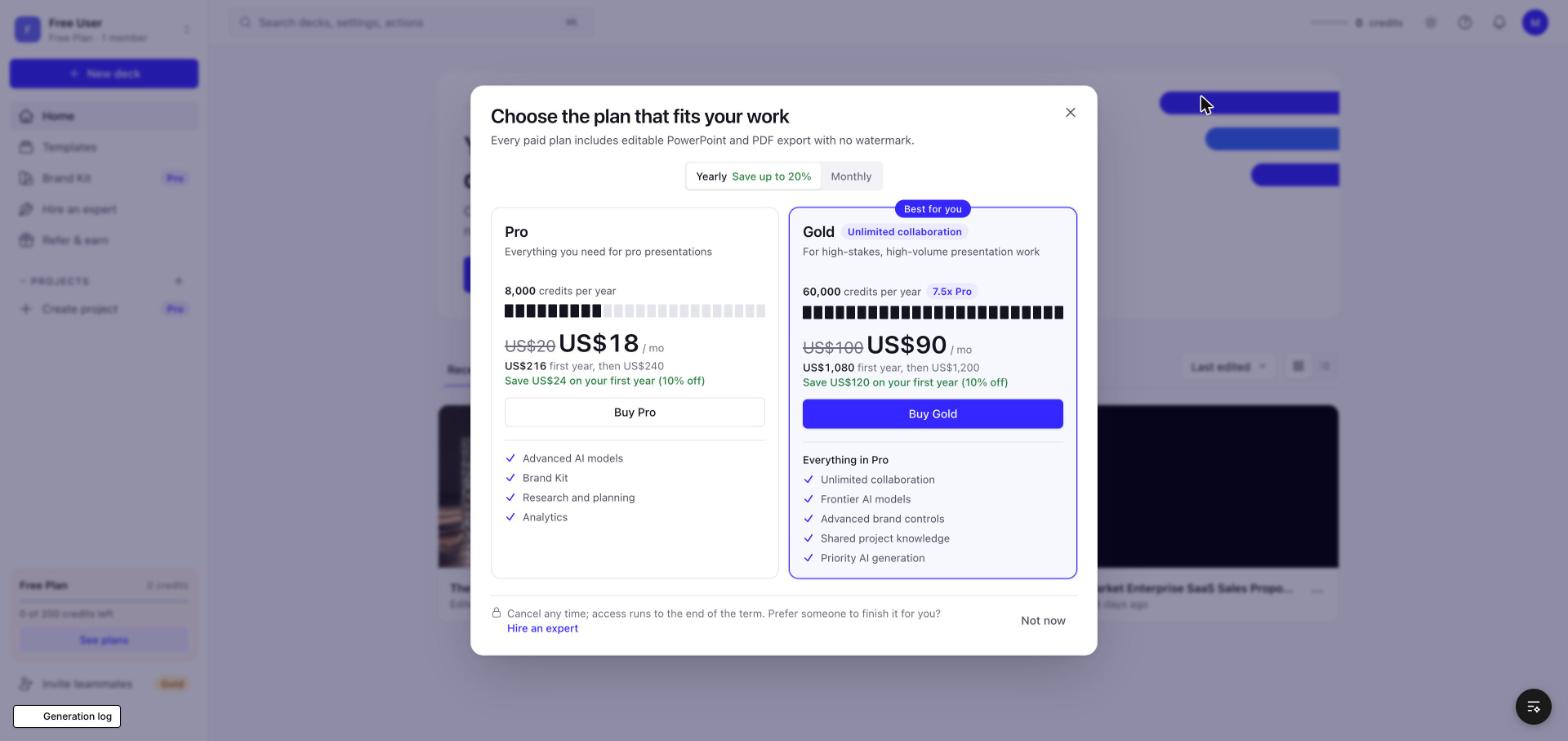
- While the offer runs, the yearly plan cards show it (struck monthly price, "US$216 first year, then US$240", "Save US$24 on your first year (10% off)").
3. Checkout
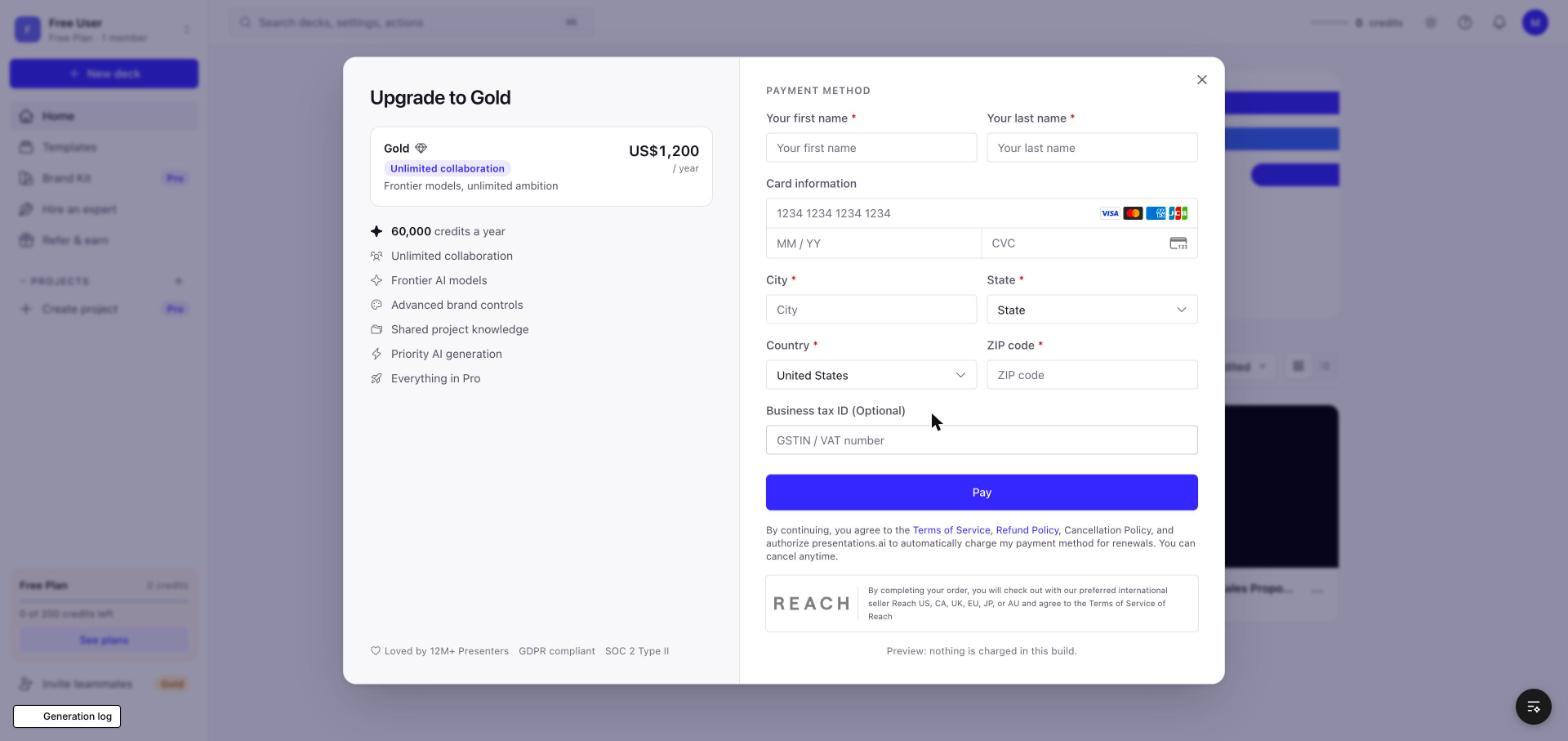
- Buy on a yearly card opens the yearly checkout for that plan. If no offer is running, the first close applies the same 10% in place: "Before you go, 10% off for the next hour." (CheckoutScreenV2 handleClose). Closing again returns to the plans, now showing the offer.
- The offer is yearly only: monthly cards never show it and Buy on Monthly opens the monthly checkout at full price.
- Offers never stack; the in-place offer is the same 10% tier as the instant offer.
- Checkout rules: only the plan being bought, plain white card, no radio, no other plans, no order summary; right side is the live card form.
4. After the hour
- The timer ends the offer and the cards go back to full price. The live bottom-right "last call" reminder (useOfferReminderV2) is not part of this handoff.
5. Paid accounts
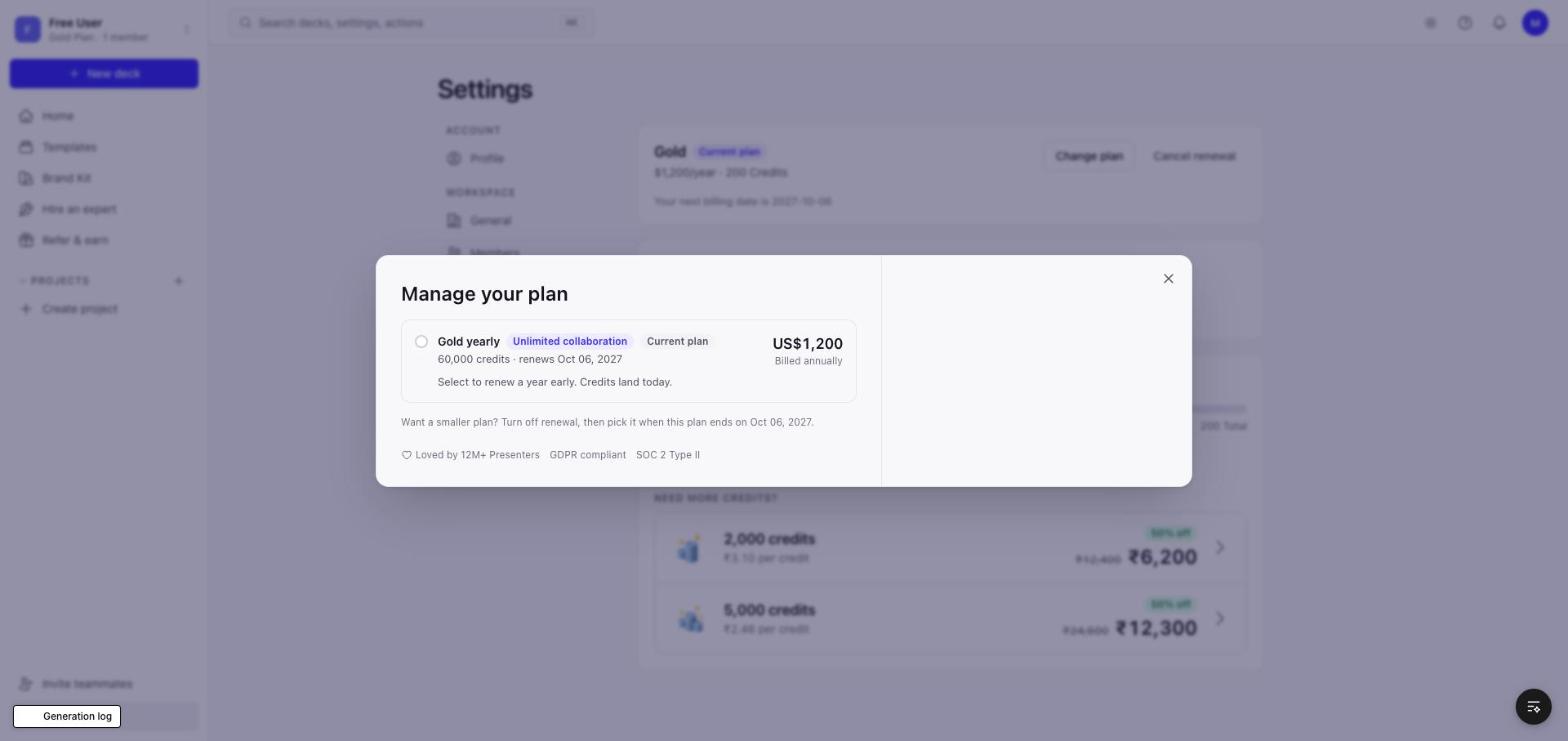
- Same Manage your plan as the Question discount handoff: up only, no yearly to monthly, Gold is the top plan, change starts today, unused credits carry over, one-click payment.
6. Backend
- Monthly Pro / Gold SKUs (prices and credits). The offer resolves and claims on the server as live (resolveCloseOffer / applyCloseBump); the local build runs it client-side on the US preview catalog.
Pricing page
Plans: Yearly (default)
Yearly / Monthly switch at the top, 'Save up to 20%'. US catalog: no Basic. Pro US$240 (US$20 / mo, 8,000 credits), Gold US$1,200 (US$100 / mo, 60,000 credits, Best for you, Unlimited collaboration). No Team plan. Yearly cards show 'Save US$X a year vs monthly'.
Plans: Monthly
Pro US$25 / mo (800 credits a month) and Gold US$120 / mo (6,000 credits a month), 'Billed monthly. Unused credits carry over.' Gold monthly also has Unlimited collaboration. The instant offer never applies to monthly.
Instant offer
Close the plans: instant offer
Free accounts, first close of the plans: 'Save 10% on your first year' (CLOSE_COUPONS.pricing, PRESENT10) with a one-hour timer. Pro US$216, Gold US$1,080. This is the current live flow (CloseNudgeV2).
Apply 10% discount: yearly checkout
Checkout for the chosen plan only (plain white card, no radio, no other plans, no order summary), with the '10% off · Ends in MM:SS' pill, struck price and 'Save US$24'. Right: the live card form.
Back on the plans with the offer running
Closing the checkout returns to the plans; yearly cards show the offer (struck monthly price, 'US$216 first year, then US$240', 'Save US$24 on your first year (10% off)'). Monthly cards stay at full price.
Checkout
Yearly checkout with no offer yet
Buy Gold straight from the cards: the Gold card only, 60,000 credits a year and Gold's features.
First close: 'Before you go, 10% off for the next hour.'
Closing a yearly checkout with no offer running applies the same 10% in place: the brand tab above the dialog, the pill, struck price and Save line. Closing again goes back to the plans with the offer (live CheckoutScreenV2 behaviour).
Monthly checkout
Buy on Monthly: the monthly plan only, 800 credits a month (Pro), renewal terms. No offer on monthly.
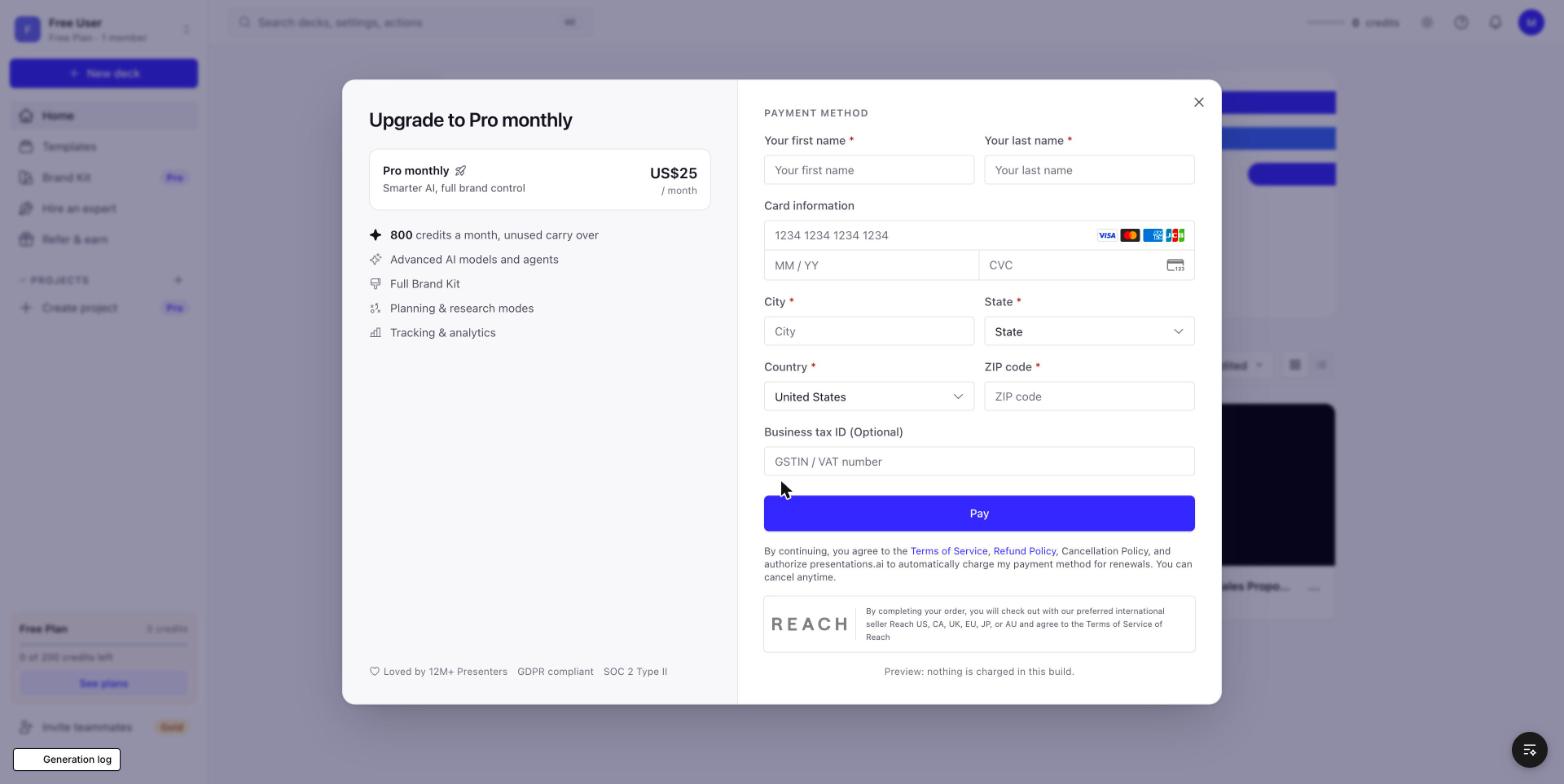
Manage your plan
Paid account: Change plan (Pro monthly)
Shared with the Question discount handoff. Current plan on top, Monthly / Yearly switch, plan cards with the selected plan's points inside, one-click payment on the right.
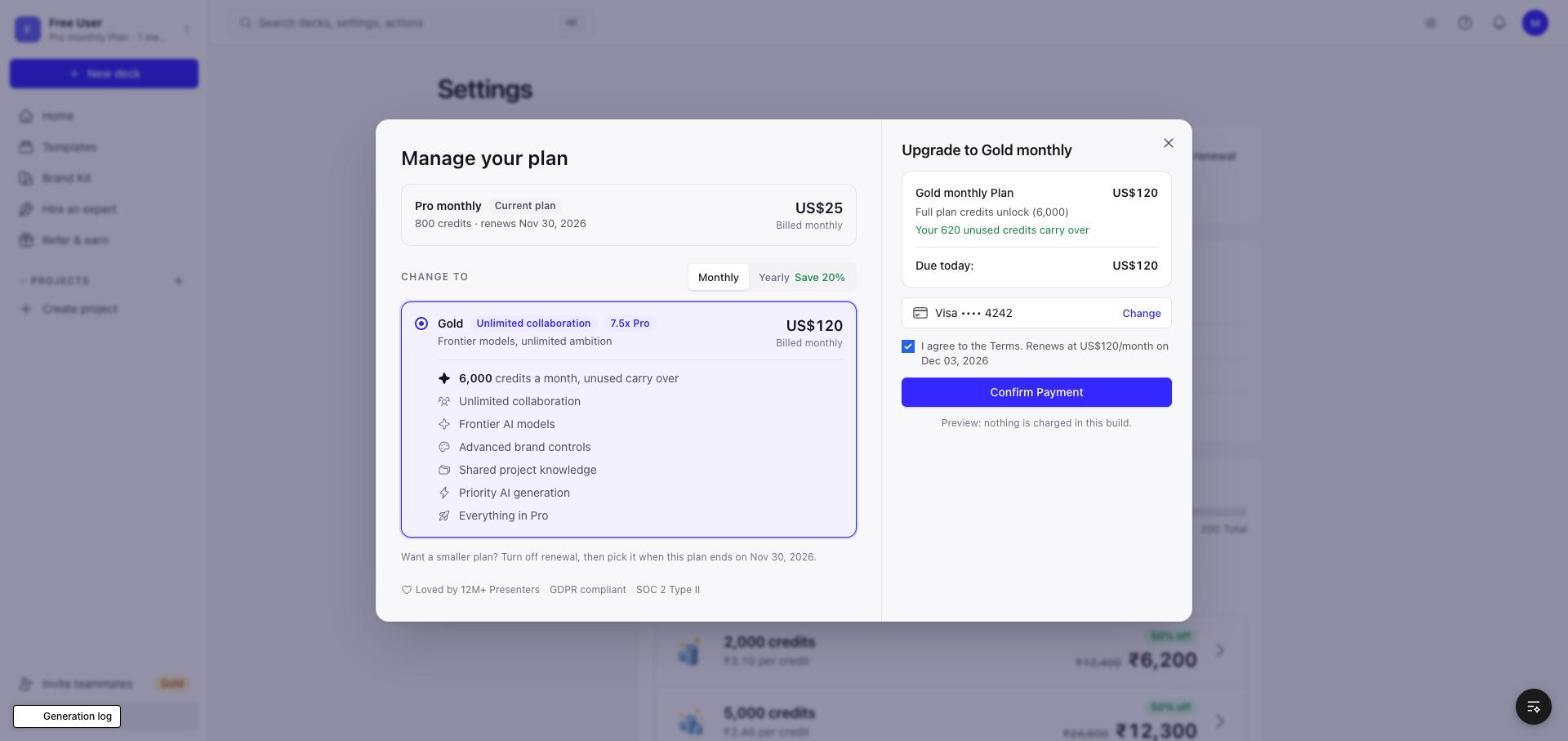
Pro monthly to Pro yearly
'Save US$60 a year' on Pro yearly, '7.5x Pro' on Gold yearly.
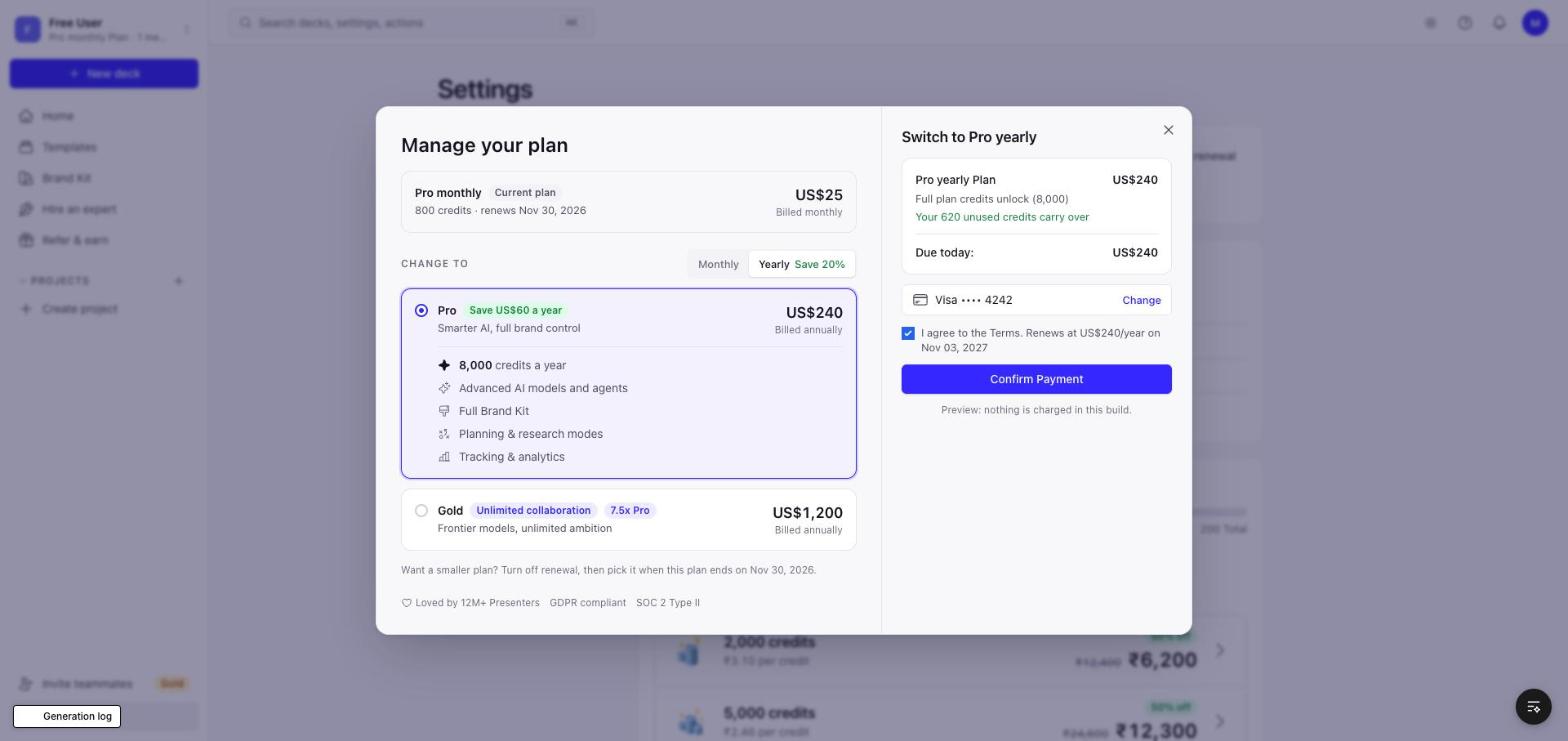
Manage your plan: Gold yearly (top plan)
Gold is the team plan: Unlimited collaboration, same price and credits. Nothing to move to, so only Renew early shows. No Team link.